Quick start
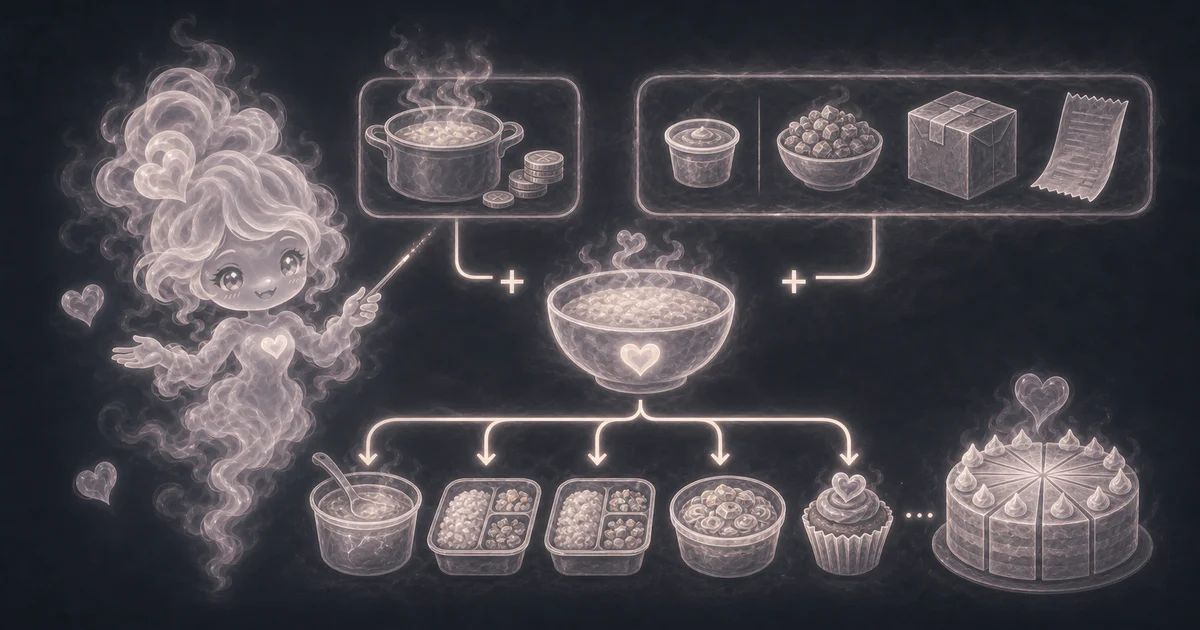
- Enter the recipe, meal, or item name so the result is easy to recognize later.
- Enter the main cost, usually the total ingredient cost for the batch.
- Enter extra cost only for packaging, toppings, sides, delivery fees, labor, or overhead you want included.
- Enter the number of same-size servings the batch actually makes after cooking, cutting, packing, or cooling.
Best uses
Start here if one of these sounds like your job. The examples below show which inputs matter most.
- Price meal prep containers by serving.
- Estimate bake sale cost before choosing a selling price.
- Compare homemade meals with takeout or store-bought food.
- Add packaging or topping costs before dividing by servings.
What this calculator is solving
The Cost Per Serving Calculator takes a batch total and divides it by the number of servings you actually plan to use. It is helpful for meal prep, family food budgeting, bake sales, and quick homemade-versus-store-bought comparisons.
Match each input label on the calculator to the real batch cost, any extras you want counted, and the serving count you will actually use.
The formula in plain language
In plain language: Cost per serving = (main cost + extra cost) / servings. The calculator also keeps total batch cost and extra cost visible so you can see what was included before dividing. The examples on the page are there so you can compare your inputs with a worked example before copying the answer.
Cost per serving = (main cost + extra cost) / servings. Total batch cost = main cost + extra cost.
How to read the answer
Read the result as an average cost per equal serving. It is a planning number, so it is strongest when the portions are close to the same size.
- Cost per serving is the average cost for one portion.
- Total batch cost shows main cost plus extras, so you can see what was included before division.
- Extra cost included confirms whether containers, toppings, or fees were counted.
- Servings confirms the divisor used in the estimate.
Common mistakes to avoid
Most bad serving-cost estimates come from an optimistic serving count or costs left outside the batch total.
- Do not use a fantasy serving count just to make the cost look low.
- Do not leave out containers, labels, toppings, sauces, delivery fees, or payment fees when they change the decision.
- Do not treat the result as a selling price. Profit, labor, taxes, spoilage, unsold items, and local rules are separate.
- Do not trust the average when one serving is much larger than another.
- Do not compare homemade food with takeout unless you are clear about which costs and portion sizes are included.
Example: soup batch
Say a soup costs $18.50 in ingredients and you want to include $2.00 for containers or toppings. The total batch cost is $20.50.
If the batch makes 8 servings, the cost per serving is $20.50 / 8, or about $2.56. That is the number to compare with a meal-prep container, a store soup cup, or the price you would need to charge before profit.
Use ingredient cost first when the total is fuzzy
If you do not know the batch total yet, price the ingredients before using this guide. A bag of flour, a carton of eggs, or a bottle of oil should be converted into the amount the recipe actually uses.
Once those ingredient costs are added together, put the total into the Cost Per Serving Calculator and divide by servings.
Meal prep and food sales are different decisions
For home meal prep, a simple ingredient-only estimate may be enough. For a bake sale, side hustle, catering tray, or menu item, the cost per serving is only the starting point.
Selling food can also need packaging, labels, payment fees, failed batches, unsold items, kitchen time, delivery, taxes, and local rules. Add the costs you can estimate, then treat the result as cost, not profit.
Uneven servings make the answer an average
The calculator assumes each serving is the same size. That is fine for 10 packed meal-prep bowls or 24 similar cupcakes, but it is weaker for random scoops, uneven cake slices, or a family dinner where portions vary.
If portion size matters, weigh or divide the batch first. Otherwise, read the result as a rough average per person.
Cost per serving is not unit price
Unit price compares packages by a shared unit such as ounces, pounds, rolls, or tablets. Cost per serving starts after you know the recipe or batch total.
Use unit price while shopping, ingredient cost while building the recipe total, then cost per serving when you want the per-portion answer.
Research and references
These references support cost-per-serving topic checks and people-first calculator guidance.
Worked examples for Cost Per Serving Calculator
$2.56 per serving from a $20.50 batch.
$4.20 per serving before containers or sauces.
About $0.79 per cupcake before your selling margin.
$5.20 per plate if portions are equal.
FAQ in plain language
When should I use the Cost Per Serving Calculator?
Use it when your task matches one of these common needs: Price meal prep containers by serving. Estimate bake sale cost before choosing a selling price. It works best when you already know the measurements, amounts, units, or options the page asks for.
What is the Cost Per Serving Calculator doing with my inputs?
In plain language: Cost per serving = (main cost + extra cost) / servings. The calculator also keeps total batch cost and extra cost visible so you can see what was included before dividing. The examples on the page are there so you can compare your inputs with a worked example before copying the answer.
What do the main Cost Per Serving Calculator inputs mean?
Main cost: The recipe, meal, or batch cost before optional extras, usually the total ingredient cost. Extra cost: Optional packaging, toppings, sides, delivery fees, payment fees, estimated overhead, or labor cost you want included before dividing. Servings: How many same-size portions the batch actually makes after cooking, cooling, cutting, or packing.
How should I read the Cost Per Serving Calculator answer?
Read the headline answer, then check the smaller lines beside it. For everyday tools, those lines usually show the distance, time, cost, units, or setting that made the answer change.
What should I double-check before trusting the answer?
The answer is a planning estimate. It does not prove menu profit because it leaves out uneven portions, trim waste, leftovers, spoiled food, taxes, tips, labor, rent, utilities, payment fees, and the value of your time unless you include them in extra cost. Also check the unit, scale, mode, and result limit because small input changes can change the answer.
What counts as a serving?
A serving is the portion size you choose to count. For meal prep, it might be one container. For a cake, it might be one slice. Keep the serving size realistic or the answer will be misleading.
What should I enter as main cost?
Enter the total cost of the food batch before optional extras. If you already used the Ingredient Cost Calculator, add those ingredient costs together and use that total here.
Related tools
- Ingredient Cost CalculatorEstimate how much one recipe ingredient costs from package price and amount used.
- Recipe ScalerScale one recipe ingredient from original servings to the servings you want to make.
- Unit Price CalculatorCompare two products by price per shared unit so the cheaper package is clearer.
- Discount CalculatorFind final price after one or two discounts and optional tax.
Keep exploring
If this guide is close but not exact, these links keep you near the same kind of problem.
- Everyday ToolsBrowse the full category for related tools that help with the same job.
- All free toolsSearch the complete Access Free Tools library by task, category, or tool name.
- All calculator and utility guidesFind more plain-language examples, formulas, mistakes, and result explanations.
- Free calculator resourcesStart here when you are not sure which calculator page fits.
Privacy and copying results
Recent answers stay visible only while you work in the current browser tab. They are not sent to a server.
Use Copy answer when you want to save the inputs and result in notes, homework, a message, or a project list. Check the units, labels, and limits before copying.