Quick start
- Enter the full fence perimeter or run length in feet. Walk the fence line first so gates, corners, setbacks, and obstacles are not guesses.
- Enter panel width and post spacing in feet. Use the panel, rail, or manufacturer spacing instead of stretching the span to save one post.
- Enter gate count and gate width so the calculator can remove gate openings and add two gate posts per gate.
Best uses
Start here if one of these sounds like your job. The examples below show which inputs matter most.
- Estimate panels for a backyard fence.
- Plan post counts from a chosen spacing.
- Account for one or more gates.
- Compare 6-foot and 8-foot panel layouts.
What this calculator is solving
The Fence Calculator gives a rough material count for simple panel fencing. It subtracts gate openings, estimates panels, and counts line and gate posts before you check pickets, rails, concrete, hardware, and local rules.
Match each input label on the calculator to the real measurement, amount, rate, unit, or setting for your job.
The formula in plain language
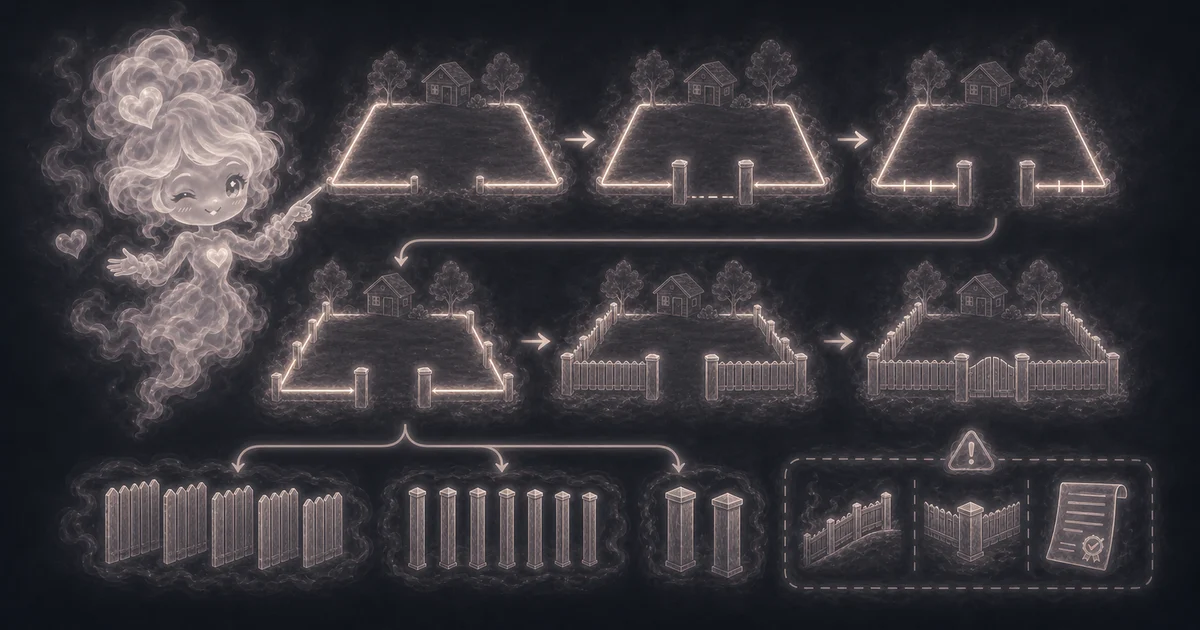
In plain language: The calculator uses fence run after gates = perimeter - gate count x gate width, panels needed = ceiling(fence run after gates / panel width), line posts = ceiling(fence run after gates / post spacing) + 1, gate posts = gate count x 2, and total posts = line posts + gate posts. The examples on the page are there so you can compare your inputs with a fence material example before copying the answer.
The example cards on the calculator page show a complete set of inputs and the kind of answer you should expect.
How to read the answer
Read the main result first. Then check the smaller lines for the totals, units, ranges, counts, or formula steps behind it.
- Panels needed rounds up the remaining fence run divided by panel width.
- Fence run after gates shows how much perimeter is still filled with panels.
- Total posts includes line posts plus two posts per gate. The default 120 ft example with one 4 ft gate leaves 116 ft of panel run, which rounds to 15 panels and 18 total posts.
Common mistakes to avoid
If the answer looks strange, the most likely cause is a small input mismatch: a mixed unit, copied value, wrong mode, missing label, or result used for the wrong job.
- Do not treat line posts as a full post schedule. Corners, ends, brace posts, terminal posts, and gate loads may need extra or stronger posts.
- Do not ignore slope, soil, setbacks, underground utilities, wind exposure, frost depth, and permits.
- Pickets, rails, concrete, gravel, fasteners, post caps, gate hardware, latch clearance, and custom panel cuts need separate planning.
Research and references
These references help check the measurements, units, limits, or safety notes used in this guide.
Worked examples for Fence Calculator
116 ft run, 15 panels, 18 total posts
172 ft run, 29 panels, 34 total posts
48 ft run, 6 panels, 7 total posts
142 ft run, 18 panels, 23 total posts
FAQ in plain language
When should I use the Fence Calculator?
Use it when your task matches one of these common needs: Estimate panels for a backyard fence. Plan post counts from a chosen spacing. It works best when you already know fence perimeter, panel width, post spacing, gate count, and gate width.
What is the Fence Calculator doing with my inputs?
In plain language: The calculator uses fence run after gates = perimeter - gate count x gate width, panels needed = ceiling(fence run after gates / panel width), line posts = ceiling(fence run after gates / post spacing) + 1, gate posts = gate count x 2, and total posts = line posts + gate posts. The examples on the page are there so you can compare your inputs with a fence material example before copying the answer.
What do the main Fence Calculator inputs mean?
Perimeter: the total fence path length before gate openings are removed. Panel width: the width of one fence panel or bay before cuts. Post spacing: the maximum distance between line posts based on the material or rail span. Gate count and width: openings that reduce panel run and usually need two gate posts per gate.
How should I read the Fence Calculator answer?
Read the headline estimate first, then check the material, waste, coverage, and unit lines. For project tools, the supporting lines are often the difference between a rough idea and a list you can actually shop from.
What should I double-check before trusting the answer?
This is a rough panel-and-post count. Real fences also need corner posts, end posts, brace posts, terminal posts, pickets, rails, concrete, gravel, fasteners, post caps, gate hardware, slope handling, utility marking, permits, setbacks, wind exposure, soil checks, and local code review. Also check corner posts, end posts, brace posts, terminal posts, rails, pickets, concrete, fasteners, gate hardware, utilities, setbacks, and local code before buying.
What does the Fence Calculator include?
It estimates fence run after gates, panels needed, line posts, gate posts, and total posts. It does not directly count pickets, rails, concrete bags, screws, brackets, post caps, or gate hardware.
How does gate width change the fence estimate?
Gate openings are subtracted from the panel run, so fewer panels may be needed. Each gate also adds two gate posts in this simple estimate, because a gate usually needs a post on each side.
Related tools
- Distance CalculatorStraight-line distance between two 2D points, plus distance squared, deltas, midpoint, and formula steps.
- Square Footage CalculatorCalculate square feet, square yards, and square meters from length, width, and quantity.
- Paint CalculatorEstimate interior wall paint gallons from room size, openings, coats, coverage, and extra percent.
Keep exploring
If this guide is close but not exact, these links keep you near the same kind of problem.
- Home & ProjectsBrowse the full category for related tools that help with the same job.
- All free toolsSearch the complete Access Free Tools library by task, category, or tool name.
- All calculator and utility guidesFind more plain-language examples, formulas, mistakes, and result explanations.
- Free calculator resourcesStart here when you are not sure which calculator page fits.
Privacy and copying results
Recent answers stay visible only while you work in the current browser tab. They are not sent to a server.
Use Copy answer when you want to save the inputs and result in notes, homework, a message, or a project list. Check the units, labels, and limits before copying.