Quick start
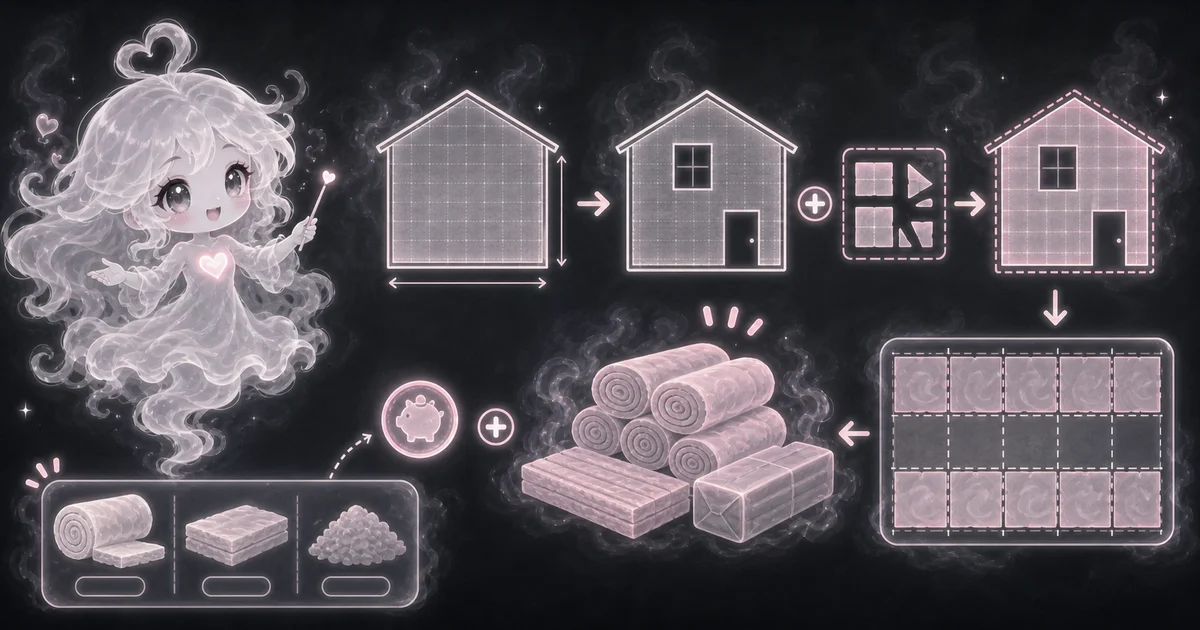
- Enter the area before openings, then subtract windows, doors, hatches, or other spaces.
- Enter coverage per pack from the product label for the chosen thickness or R-value.
- Add waste for cutting, odd cavities, and fitting mistakes.
Best uses
Start here if one of these sounds like your job. The examples below show which inputs matter most.
- Estimate insulation packs for walls, attics, or floor areas.
- Subtract doors, windows, and hatches before waste.
- Use product-label coverage per package.
- Estimate rough cost from price per pack.
What this calculator is solving
The Insulation Calculator estimates package count after you choose an insulation product. It helps with quantity, not code approval or product selection.
Match each input label on the calculator to the real measurement, amount, rate, unit, or setting for your job.
The formula in plain language
In plain language: The calculator subtracts openings from measured area, adds waste, divides by square feet covered per pack, and rounds up to whole packs. The examples on the page are there so you can compare your inputs with a worked example before copying the answer.
The example cards on the calculator page show a complete set of inputs and the kind of answer you should expect.
How to read the answer
Read the main result first. Then check the smaller lines for the totals, units, ranges, counts, or formula steps behind it.
- Packs needed is rounded up to whole packages.
- Adjusted area shows net area after openings and waste.
- Total coverage bought helps compare the rounded package count with the area needed.
- For example, a 1,200 square foot attic using packs that cover 48 square feet each with 10% waste needs 28 packs.
Common mistakes to avoid
If the answer looks strange, the most likely cause is a small input mismatch: a mixed unit, copied value, wrong mode, missing label, or result used for the wrong job.
- Do not confuse square-foot coverage with R-value.
- Do not skip air sealing, vapor control, ventilation, moisture checks, fire rules, or local code.
- Do not use one pack coverage number for every R-value. Thicker insulation often covers less area per pack.
- Use the product label, local code, and climate guidance before choosing the actual insulation.
What R-value means
R-value describes resistance to heat flow. A higher R-value usually slows heat movement more, but the right target depends on the room, climate, assembly, product type, and code.
This tool does not pick the R-value. It estimates how many packs you need after you pick a product and know the product coverage.
Quick square-foot example
Say an attic is 1,200 square feet. The insulation pack says it covers 48 square feet at the R-value you picked. You add 10% waste for cuts and awkward spots.
The adjusted area is 1,200 x 1.10 = 1,320 square feet. Then 1,320 / 48 = 27.5, so you round up and buy 28 packs.
Why the product label matters
Insulation coverage is not one fixed number. A roll, batt pack, or blown-in bag may cover a different square-foot area at R-13, R-30, R-38, or R-49.
That is why the calculator asks for coverage per pack instead of guessing. The FTC says R-value information should be available before you buy, and ENERGY STAR recommends choosing R-value by climate and home location.
Research and references
These references help check the measurements, units, limits, or safety notes used in this guide.
- ENERGY STAR: Attic insulation guidance
- ENERGY STAR: Recommended home insulation R-values
- ENERGY STAR: Well-insulated and sealed attic
- FTC: What to know when buying home insulation
- NIST: Guide for the Use of the International System of Units
- Google Search Central: Creating helpful, reliable, people-first content
Worked examples for Insulation Calculator
25 packs
28 packs
14 packs
FAQ in plain language
When should I use the Insulation Calculator?
Use it when your task matches one of these common needs: Estimate insulation packs for walls, attics, or floor areas. Subtract doors, windows, and hatches before waste. It works best when you already know the measurements, amounts, units, or options the page asks for.
What is the Insulation Calculator doing with my inputs?
In plain language: The calculator subtracts openings from measured area, adds waste, divides by square feet covered per pack, and rounds up to whole packs. The examples on the page are there so you can compare your inputs with a worked example before copying the answer.
What do the main Insulation Calculator inputs mean?
Area: the wall, ceiling, floor, or attic square footage before subtracting openings. Openings: windows, doors, attic hatches, or other spaces that should not receive insulation. Coverage per pack: the square feet one package covers at the product thickness or R-value. Waste percent: extra insulation for cuts, odd cavities, fitting, and mistakes.
How should I read the Insulation Calculator answer?
Read the headline estimate first, then check the material, waste, coverage, and unit lines. For project tools, the supporting lines are often the difference between a rough idea and a list you can actually shop from.
What should I double-check before trusting the answer?
Insulation is not just area. R-value, climate zone, air sealing, vapor control, moisture, ventilation, fire rules, and local code all matter. Also check the unit, scale, mode, and result limit because small input changes can change the answer.
What does R-value mean in insulation planning?
R-value is resistance to heat flow. Higher R-value usually slows heat movement more, but the right target depends on the location, climate, product type, and code.
Can this choose the correct insulation for my house?
No. It estimates packs after you choose a product. Use local code, ENERGY STAR or DOE guidance, and product labels to choose the right R-value and installation method.
Related tools
- BTU CalculatorEstimate room air conditioner BTU/h from room size, ceiling height, sun, people, and kitchen heat.
- Square Footage CalculatorCalculate square feet, square yards, and square meters from length, width, and quantity.
- Drywall CalculatorEstimate drywall sheet count from project area, sheet size, and waste percentage.
Keep exploring
If this guide is close but not exact, these links keep you near the same kind of problem.
- Home & ProjectsBrowse the full category for related tools that help with the same job.
- All free toolsSearch the complete Access Free Tools library by task, category, or tool name.
- All calculator and utility guidesFind more plain-language examples, formulas, mistakes, and result explanations.
- Free calculator resourcesStart here when you are not sure which calculator page fits.
Privacy and copying results
Recent answers stay visible only while you work in the current browser tab. They are not sent to a server.
Use Copy answer when you want to save the inputs and result in notes, homework, a message, or a project list. Check the units, labels, and limits before copying.