Quick start
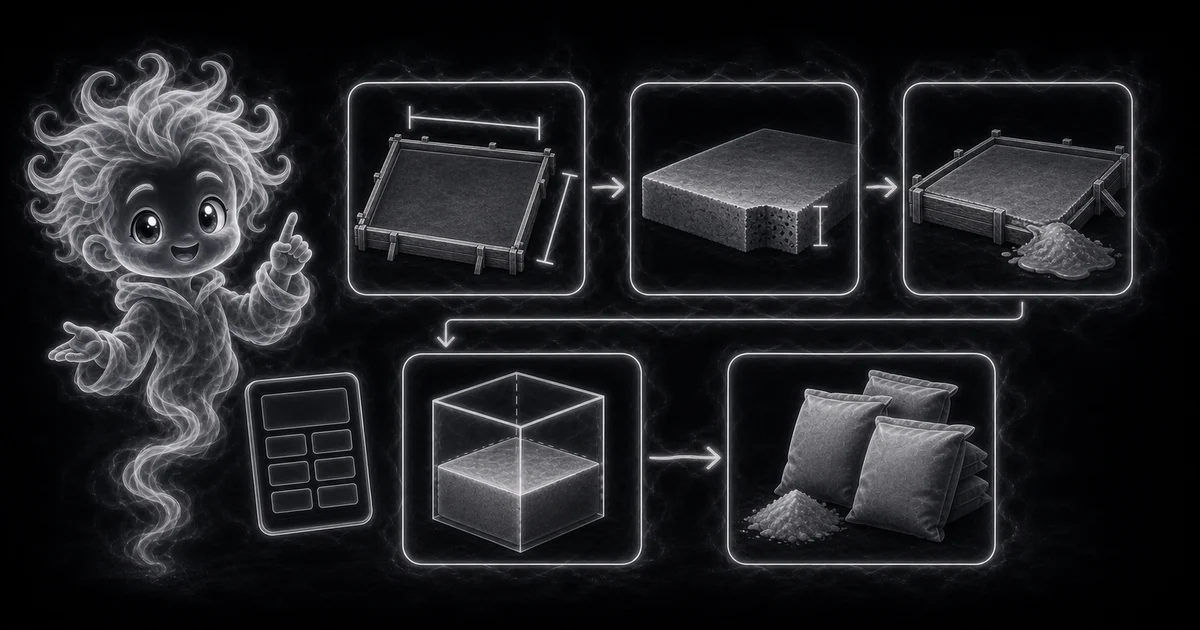
- Enter length and width in feet using the inside edges of the form.
- Enter slab depth in inches. The calculator converts that depth to feet before multiplying.
- Add extra waste percentage when the site, forms, base, or ordering method need a buffer.
Best uses
Start here if one of these sounds like your job. The examples below show which inputs matter most.
- Estimate concrete for a simple slab, pad, walkway, or small project.
- Convert cubic feet to cubic yards before ordering ready-mix.
- Estimate common 40 lb, 60 lb, and 80 lb bag counts.
- Add waste percentage before buying materials.
What this calculator is solving
The Concrete Calculator is a first-pass material estimator for a simple rectangular slab, pad, or walkway. It converts slab dimensions into cubic feet, cubic yards, cubic meters, and approximate bag counts.
Match each input label on the calculator to the real measurement, amount, rate, unit, or setting for your job.
The formula in plain language
In plain language: The calculator uses cubic feet = length x width x (depth inches / 12), adjusted cubic feet = cubic feet x (1 + waste percent / 100), cubic yards = adjusted cubic feet / 27, cubic meters = adjusted cubic feet x 0.0283168, and bag counts = adjusted cubic feet / bag yield rounded up. The examples on the page are there so you can compare your inputs with a concrete slab example before copying the answer.
The example cards on the calculator page show a complete set of inputs and the kind of answer you should expect.
How to read the answer
Read the main result first. Then check the smaller lines for the totals, units, ranges, counts, or formula steps behind it.
- Cubic yards is the common ready-mix ordering unit in the United States. The calculator divides adjusted cubic feet by 27.
- Cubic feet helps with small projects and bag estimating.
- Bag counts are rounded up because you cannot buy a partial bag, and the exact yield should be checked on the bag label.
- A 10 ft by 12 ft slab at 4 inches thick is 40 cubic feet before waste and about 1.63 cubic yards with 10% waste.
Common mistakes to avoid
If the answer looks strange, the most likely cause is a small input mismatch: a mixed unit, copied value, wrong mode, missing label, or result used for the wrong job.
- Do not use feet for depth when the field expects inches.
- Do not ignore uneven ground, form loss, low spots, spillage, base prep, or compaction.
- Ask a qualified contractor or supplier for structural work, code-sensitive pours, ready-mix truck minimums, and final ordering.
Research and references
These references help check the measurements, units, limits, or safety notes used in this guide.
Worked examples for Concrete Calculator
1.63 yd3 and 74 80 lb bags
0.98 yd3 and 44 80 lb bags
0.41 yd3 and 19 80 lb bags
2.72 yd3 and 123 80 lb bags
FAQ in plain language
When should I use the Concrete Calculator?
Use it when your task matches one of these common needs: Estimate concrete for a simple slab, pad, walkway, or small project. Convert cubic feet to cubic yards before ordering ready-mix. It works best when you already know length, width, depth, and waste percent.
What is the Concrete Calculator doing with my inputs?
In plain language: The calculator uses cubic feet = length x width x (depth inches / 12), adjusted cubic feet = cubic feet x (1 + waste percent / 100), cubic yards = adjusted cubic feet / 27, cubic meters = adjusted cubic feet x 0.0283168, and bag counts = adjusted cubic feet / bag yield rounded up. The examples on the page are there so you can compare your inputs with a concrete slab example before copying the answer.
What do the main Concrete Calculator inputs mean?
Length and width: the inside form dimensions of the slab, pad, or walkway in feet. Depth: the average concrete thickness in inches, such as 4 for a common small slab. Extra waste: a cushion for uneven base, spillage, low spots, and ordering a little more than the exact volume.
How should I read the Concrete Calculator answer?
Read the headline estimate first, then check the material, waste, coverage, and unit lines. For project tools, the supporting lines are often the difference between a rough idea and a list you can actually shop from.
What should I double-check before trusting the answer?
This is a planning estimate, not structural design or a supplier order guarantee. Forms, uneven ground, compaction, reinforcement, base prep, spillage, waste, truck minimums, weather, and exact bag yield can change what you need. Also check whether the depth is in inches, whether the slab shape is rectangular, whether the base is level, and whether you are ordering ready-mix cubic yards or buying bagged mix.
How do I calculate cubic yards for concrete?
Multiply length by width by depth in feet to get cubic feet, then divide by 27 for cubic yards. For a 10 ft by 12 ft slab at 4 inches thick, the exact volume is 40 cubic feet before waste and about 1.63 cubic yards with 10% waste.
Why does the calculator show 40 lb, 60 lb, and 80 lb bags?
Small jobs often use bagged concrete instead of a ready-mix truck. The bag counts use common approximate yields, then round up because you cannot buy part of a bag. Always check the yield printed on the exact bag before buying.
Related tools
- Rebar CalculatorEstimate rebar grid counts, linear feet, and stock bars from slab size and spacing.
- Gravel CalculatorEstimate gravel cubic yards and tons from length, width, depth, and density.
- Square Footage CalculatorCalculate square feet, square yards, and square meters from length, width, and quantity.
Keep exploring
If this guide is close but not exact, these links keep you near the same kind of problem.
- Home & ProjectsBrowse the full category for related tools that help with the same job.
- All free toolsSearch the complete Access Free Tools library by task, category, or tool name.
- All calculator and utility guidesFind more plain-language examples, formulas, mistakes, and result explanations.
- Free calculator resourcesStart here when you are not sure which calculator page fits.
Privacy and copying results
Recent answers stay visible only while you work in the current browser tab. They are not sent to a server.
Use Copy answer when you want to save the inputs and result in notes, homework, a message, or a project list. Check the units, labels, and limits before copying.