Quick start
- Enter the combined countertop run length in feet. For L-shaped counters with the same depth, add the straight runs together.
- Enter finished depth in inches. If an island, peninsula, or vanity has a different depth, estimate that section separately.
- Enter backsplash run length and height only when the backsplash uses the same material.
- Enter cutout square feet only when you want a rough material-area subtraction, not a labor-price adjustment.
Best uses
Start here if one of these sounds like your job. The examples below show which inputs matter most.
- Estimate countertop square footage for a kitchen or vanity.
- Add backsplash area when the backsplash uses the same material.
- Subtract known cutout area for rough material planning.
- Compare quartz, granite, laminate, or solid-surface rough cost at different material prices.
What this calculator is solving
The Countertop Calculator estimates rough material area for kitchen counters, vanity tops, islands, peninsulas, and backsplash pieces.
Match each input label on the calculator to the real measurement, amount, rate, unit, or setting for your job.
The formula in plain language
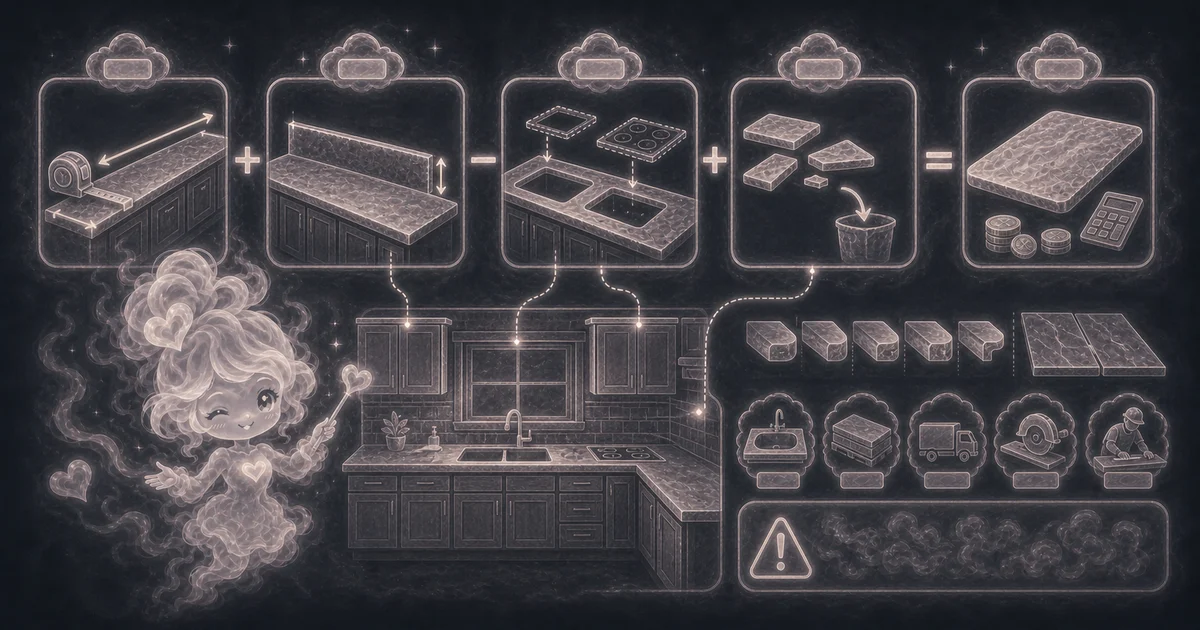
In plain language: The calculator converts depth and backsplash height to feet, multiplies each run by its depth, adds backsplash area, subtracts known cutouts, adds waste, and multiplies by price when entered. The examples on the page are there so you can compare your inputs with a worked example before copying the answer.
The example cards on the calculator page show a complete set of inputs and the kind of answer you should expect.
How to read the answer
Read the main result first. Then check the smaller lines for the totals, units, ranges, counts, or formula steps behind it.
- Adjusted area is the square footage after adding backsplash, subtracting cutouts, and adding waste.
- Top area and backsplash area show the pieces separately.
- Estimated cost multiplies adjusted area by your price per square foot when entered.
Common mistakes to avoid
If the answer looks strange, the most likely cause is a small input mismatch: a mixed unit, copied value, wrong mode, missing label, or result used for the wrong job.
- Do not treat this as a fabricator quote.
- Do not forget seams, overhangs, edge profiles, sink cutouts, slab minimums, delivery, templates, or install labor.
- Ask the countertop supplier how they price cutouts and leftover slab material.
Quick kitchen countertop example
Say a kitchen has 18 feet of counter at 25.5 inches deep, an 18 foot backsplash that is 4 inches high, 4 square feet of sink and cooktop cutouts, and 10% waste.
Top area is 18 x 25.5 / 12 = 38.25 square feet. Backsplash area is 18 x 4 / 12 = 6 square feet. After subtracting 4 square feet of cutouts, the net area is 40.25 square feet. With 10% waste, the planning estimate is 44.275 square feet.
L-shaped counters, islands, and different depths
For a simple L-shape where both legs use the same depth, add the two straight lengths and enter the combined run. A 10 foot leg plus an 8 foot leg becomes 18 feet.
If part of the kitchen is deeper, such as a 42 inch island or a peninsula, run that section separately. Add the adjusted square feet from each result before comparing material prices.
Why quotes can beat the square-foot number
The calculator is area math. A real countertop quote can include slab layout, seam placement, pattern matching, edge profiles, sink type, cutout labor, templating, removal, delivery, installation, and minimum slab purchase rules.
Use the result to compare early options, then ask the fabricator how they handle cutouts, backsplash, leftover material, edge upgrades, and minimum charges.
Research and references
These references help check the measurements, units, limits, or safety notes used in this guide.
Worked examples for Countertop Calculator
44.275 ft2 after waste
11.88 ft2 after waste
26.46 ft2 after waste
42.075 ft2 after waste
FAQ in plain language
When should I use the Countertop Calculator?
Use it when your task matches one of these common needs: Estimate countertop square footage for a kitchen or vanity. Add backsplash area when the backsplash uses the same material. It works best when you already know the measurements, amounts, units, or options the page asks for.
What is the Countertop Calculator doing with my inputs?
In plain language: The calculator converts depth and backsplash height to feet, multiplies each run by its depth, adds backsplash area, subtracts known cutouts, adds waste, and multiplies by price when entered. The examples on the page are there so you can compare your inputs with a worked example before copying the answer.
What do the main Countertop Calculator inputs mean?
Run length: the combined straight countertop runs in feet. Add matching-depth L-shape sections together, or estimate different depths separately. Depth: finished front-to-wall countertop depth in inches, including overhang when it is part of the top. Backsplash: optional backsplash run length and height added to the square footage. Cutouts: sink or cooktop areas subtracted before waste when you know them, while remembering labor charges usually remain.
How should I read the Countertop Calculator answer?
Read the headline estimate first, then check the material, waste, coverage, and unit lines. For project tools, the supporting lines are often the difference between a rough idea and a list you can actually shop from.
What should I double-check before trusting the answer?
Real quotes can change for slab layout, seams, sink type, cutout labor, edge profile, overhangs, templating, fabrication, install labor, delivery, and supplier minimums. Also check the unit, scale, mode, and result limit because small input changes can change the answer.
How do I calculate countertop square feet?
Multiply countertop run length by depth after converting depth from inches to feet. Add backsplash area, subtract any known cutout area, then add waste for layout and trimming.
Does this work for quartz, granite, and laminate countertops?
Yes for rough square-foot planning. Quartz, granite, laminate, solid surface, butcher block, and other materials can use the same area math, but each supplier may price slabs, seams, edges, and labor differently.
Related tools
- Unit Price CalculatorCompare two products by price per shared unit so the cheaper package is clearer.
- Discount CalculatorFind final price after one or two discounts and optional tax.
- Budget CalculatorAdd monthly income, spending, debt, and savings to see leftover money and ratios.
Keep exploring
If this guide is close but not exact, these links keep you near the same kind of problem.
- Home & ProjectsBrowse the full category for related tools that help with the same job.
- All free toolsSearch the complete Access Free Tools library by task, category, or tool name.
- All calculator and utility guidesFind more plain-language examples, formulas, mistakes, and result explanations.
- Free calculator resourcesStart here when you are not sure which calculator page fits.
Privacy and copying results
Recent answers stay visible only while you work in the current browser tab. They are not sent to a server.
Use Copy answer when you want to save the inputs and result in notes, homework, a message, or a project list. Check the units, labels, and limits before copying.