Quick start
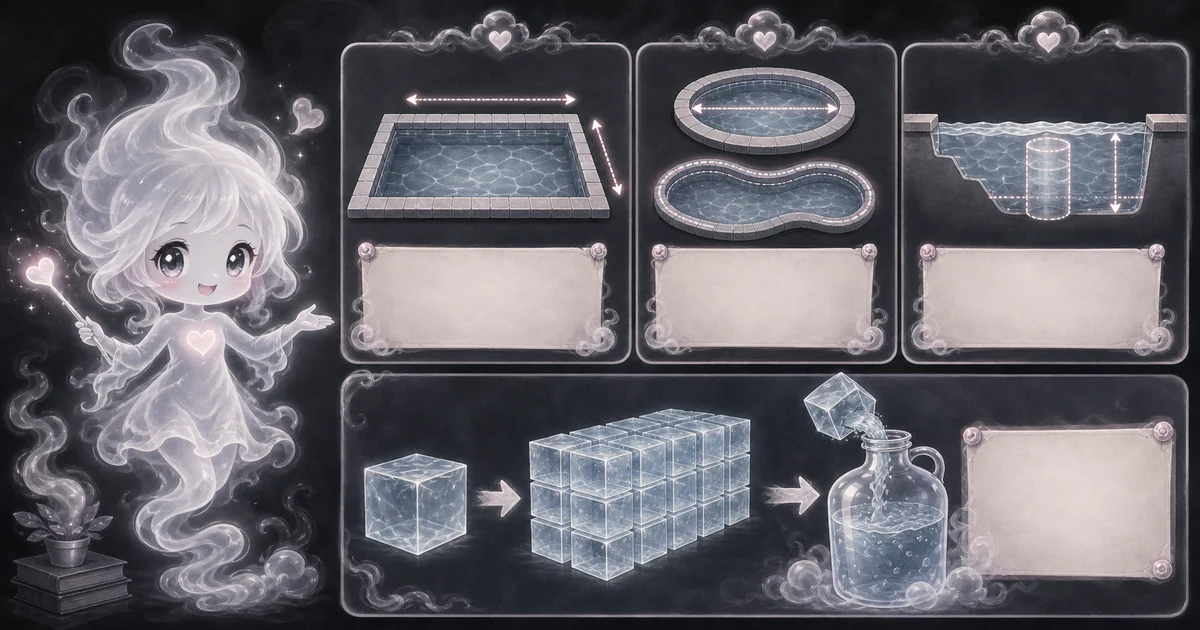
- Choose rectangle, round, or oval pool shape.
- Enter length and width, or use the diameter in both fields for a round pool.
- Enter average water depth, especially when the pool has shallow and deep ends.
Best uses
Start here if one of these sounds like your job. The examples below show which inputs matter most.
- Estimate gallons before adding pool chemicals.
- Compare rectangular, round, and oval pool volume.
- Use average depth for shallow and deep ends.
- Plan fill volume or rough equipment context.
What this calculator is solving
The Pool Volume Calculator estimates U.S. gallons from simple pool measurements. It is useful for rough chemical, fill, heater, pump, and filter context, but it is still an estimate.
Match each input label on the calculator to the real measurement, amount, rate, unit, or setting for your job.
The formula in plain language
In plain language: Rectangle cubic feet = length x width x average depth. Round or oval cubic feet = length x width x average depth x pi / 4. U.S. gallons = cubic feet x 7.48052. The examples on the page are there so you can compare your inputs with a real pool-gallon estimate before copying the answer.
The example cards on the calculator page show a complete set of inputs and the kind of answer you should expect.
How to read the answer
Read the main result first. Then check the smaller lines for the totals, units, ranges, counts, or formula steps behind it.
- Gallons is the main volume estimate.
- Cubic feet shows the intermediate volume before gallon conversion.
- Shape factor shows whether the calculator used a rectangle factor of 1 or the rounded-shape factor.
- Gallons per cubic foot shows the 7.48052 conversion used for U.S. gallons.
Common mistakes to avoid
If the answer looks strange, the most likely cause is a small input mismatch: a mixed unit, copied value, wrong mode, missing label, or result used for the wrong job.
- Do not use maximum depth when the pool has a shallow end. Use average water depth.
- Do not ignore benches, steps, curves, and waterline height.
- Do not measure from the top of the wall if the waterline sits lower.
- Use measured water testing and product labels before making chemical dosing decisions.
Quick 24 by 12 pool example
A rectangular pool that is 24 feet long, 12 feet wide, and 4.5 feet deep on average has 1,296 cubic feet of water.
Multiply 1,296 by 7.48052 gallons per cubic foot. The estimate is about 9,695 U.S. gallons.
Average depth check
For a sloped pool, average depth usually means shallow depth plus deep depth, then divided by 2. A pool that runs from 3 feet to 6 feet averages 4.5 feet.
If the pool has a flat shallow section, a sudden deep hopper, steps, benches, or a freeform shape, break it into sections or treat the answer as a rough starting point.
Research and references
These references help check the measurements, units, limits, or safety notes used in this guide.
- Pool Volume: pool volume formulas by shape
- BulkCalculator: Pool volume calculator and formulas
- Calcipedia: Pool volume calculator
- NIST SP 811: Conversion factors listed alphabetically
- NIST: Guide for the Use of the International System of Units
- Google Search Central: Creating helpful, reliable, people-first content
Worked examples for Pool Volume Calculator
9,695 gallons
7,614 gallons
11,368 gallons
10,772 gallons
FAQ in plain language
When should I use the Pool Volume Calculator?
Use it when your task matches one of these common needs: Estimate gallons before adding pool chemicals. Compare rectangular, round, and oval pool volume. It works best when you already know pool shape, length or diameter, width or diameter, and average water depth.
What is the Pool Volume Calculator doing with my inputs?
In plain language: Rectangle cubic feet = length x width x average depth. Round or oval cubic feet = length x width x average depth x pi / 4. U.S. gallons = cubic feet x 7.48052. The examples on the page are there so you can compare your inputs with a real pool-gallon estimate before copying the answer.
What do the main Pool Volume Calculator inputs mean?
Pool shape: the simple shape used for the volume formula: rectangle, round, or oval. Length or diameter: the long measurement for rectangles and ovals, or the diameter for round pools. Width or diameter: the short measurement for rectangles and ovals, or the same diameter again for a round pool. Average depth: the average water depth, useful when the shallow and deep ends differ. Measure from the waterline, not the top of the wall.
How should I read the Pool Volume Calculator answer?
Read the headline estimate first, then check the material, waste, coverage, and unit lines. For project tools, the supporting lines are often the difference between a rough idea and a list you can actually shop from.
What should I double-check before trusting the answer?
This is a shape-based estimate. Sloped bottoms, steps, benches, freeform shapes, kidney shapes, rounded corners, spas, waterline height, deep hoppers, and measurement error can change real pool volume and chemical dosing. Double-check chemical dosing against product labels, water tests, and your pool professional when the pool shape is unusual or the dose matters.
How do I calculate pool gallons?
Find cubic feet from the pool shape and average depth, then multiply by 7.48052. For a rectangle, that is length x width x average depth x 7.48052.
How do I find average pool depth?
For a steady slope, add shallow depth and deep depth, then divide by 2. For example, 3 feet plus 6 feet is 9, divided by 2, so average depth is 4.5 feet.
Related tools
- Volume CalculatorFind cubic volume for boxes, cubes, cylinders, spheres, and cones.
- Conversion CalculatorConvert length, mass, volume, and temperature units with clear formula steps.
- Cubic Yard CalculatorConvert length, width, depth, and waste into cubic feet and cubic yards.
Keep exploring
If this guide is close but not exact, these links keep you near the same kind of problem.
- Home & ProjectsBrowse the full category for related tools that help with the same job.
- All free toolsSearch the complete Access Free Tools library by task, category, or tool name.
- All calculator and utility guidesFind more plain-language examples, formulas, mistakes, and result explanations.
- Free calculator resourcesStart here when you are not sure which calculator page fits.
Privacy and copying results
Recent answers stay visible only while you work in the current browser tab. They are not sent to a server.
Use Copy answer when you want to save the inputs and result in notes, homework, a message, or a project list. Check the units, labels, and limits before copying.