Quick start
- Choose Rectangle, Round area, or Known area. Enter inside measurements in feet or the measured square feet.
- Enter sand depth in inches. For a paver bedding layer, that might be around 1 inch. For a sandbox, it might be much deeper.
- Enter tons per cubic yard from your supplier and the cubic-foot volume printed on one bag, then add waste if needed.
Best uses
Use this guide when you need a quick material estimate from dimensions or square feet before checking the bag label, supplier density, delivery minimum, or project instructions.
- Estimate sand for paver bedding or leveling.
- Estimate sand volume for a sandbox or small base layer.
- Convert cubic yards into estimated tons.
- Round a cubic-foot estimate up to whole bags using the bag label volume.
What this calculator is solving
The Sand Calculator estimates volume, tonnage, and whole bags for rectangular, round, or known-area sand layers. It is useful for paver bedding, leveling layers, sandboxes, pool-base checks, aquarium-bed rough math, and small base projects.
Match each input label on the calculator to the rectangle, round diameter, or known square-foot area, plus depth, tons per cubic yard, bag volume, and waste percent.
The formula in plain language
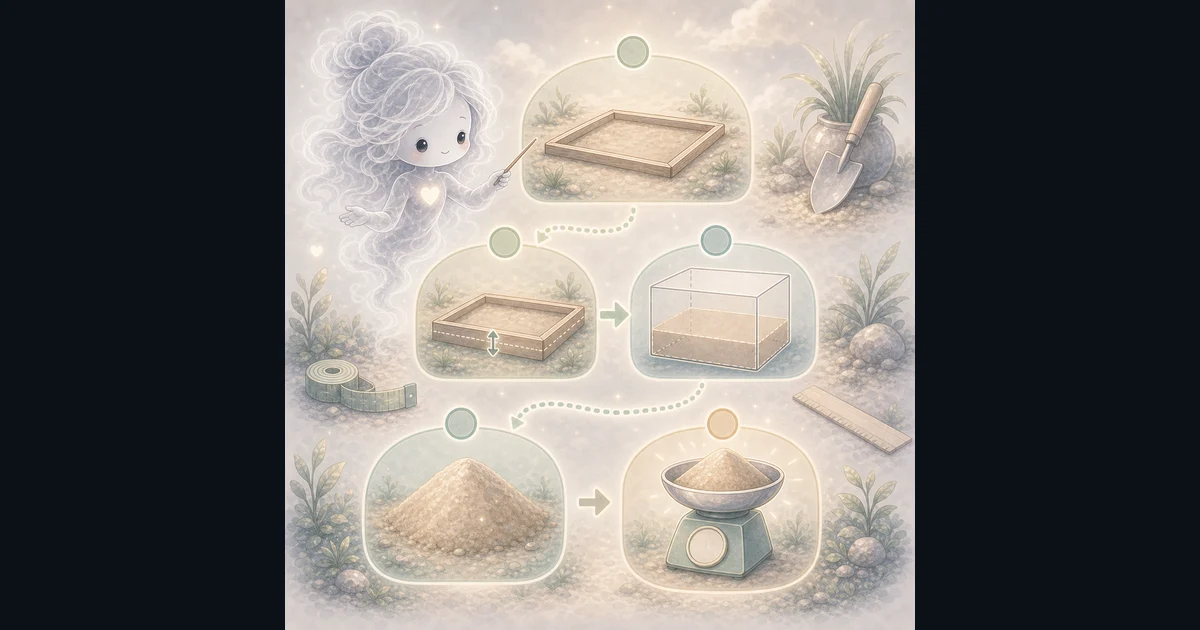
In plain language: Area = length x width, pi x (diameter / 2)^2, or known square feet. Cubic feet = area x depth inches / 12. Add waste, divide by 27 for cubic yards, multiply by density for tons, and divide by bag volume before rounding up. The examples on the page are there so you can compare your inputs with a worked example before copying the answer.
The calculator finds rectangular, circular, or known area, turns depth inches into feet, adds waste, converts cubic feet to cubic yards, estimates tons, and rounds bag volume up to whole bags.
How to read the answer
Read cubic yards as the bulk volume number, estimated tons as the supplier conversation starter, and bags as a product-label check. Dry, wet, play, concrete, and compacted sand can weigh or cover differently.
- A 10 ft by 10 ft area at 1 inch deep is 8.33 cubic feet before waste.
- With 10% waste, that becomes 9.17 cubic feet, or about 0.34 cubic yards.
- At 1.35 tons per cubic yard, the estimate is about 0.46 tons.
- At 0.5 cubic foot per bag, 9.17 cubic feet rounds up to 19 bags.
Common mistakes to avoid
The big mistake is treating every sand type like it has one fixed weight. Inch Calculator lists dry sand around 1.3 to 1.5 tons per cubic yard and wet sand around 1.5 to 1.7 tons, so supplier density matters.
- Do not assume dry and wet sand weigh the same.
- Do not forget compaction and leveling loss.
- Do not use this page as a full paver plan. Base gravel, bedding sand, joint sand, edge restraints, slope, drainage, and compaction are separate checks.
- Do not use pool or aquarium search intent as water-volume advice. This page estimates sand material, not water gallons.
- Ask the supplier for material-specific density and delivery minimums.
How To Read A Small Paver Sand Example
Say the bedding area is 10 feet by 10 feet and the sand layer is 1 inch deep. The raw volume is 8.33 cubic feet.
Add 10% waste for leveling and spreading loss. That gives about 9.17 cubic feet, or 0.34 cubic yards. At 1.35 tons per cubic yard, the rough weight is about 0.46 tons.
If the exact bag says 0.5 cubic foot, divide 9.17 by 0.5 and round up. The calculator reports 19 bags before you check the product coverage and delivery options.
Bags, Tons, And Supplier Density
The calculator uses bag volume because bags vary by product and weight. Enter the cubic-foot volume printed on the exact bag, then compare the rounded bag count with the product coverage and supplier advice.
Use supplier density when available. If it is unknown, keep tons as a planning estimate and expect moisture, compaction, and sand type to move the real order.
Pool, Aquarium, And Round-Area Limits
For pool sand, this page can estimate a rectangular sand base or help check a supplier density. It does not estimate pool water volume.
For aquarium sand, convert tank length and width to feet and use the desired sand depth in inches. Then check the product label because aquarium sand is usually bought by bag.
For a round sand base or play area, choose Round area and enter the inside diameter. Split irregular projects into simple sections and add the separate purchase estimates.
Research and references
These references back up the volume math, density caution, and cubic-yard conversion behind the calculator.
Worked examples for Sand Calculator
0.34 yd3, 0.46 tons, and 19 bags
1.36 yd3, 1.83 tons, and 74 bags
0.73 yd3, 0.99 tons, and 40 bags
1.30 yd3, 1.75 tons, and 70 bags
FAQ in plain language
When should I use the Sand Calculator?
Use it when your task matches one of these common needs: Estimate sand for paver bedding or leveling. Estimate sand volume for a sandbox or small base layer. It works best when you already know the measurements, amounts, units, or options the page asks for.
What is the Sand Calculator doing with my inputs?
In plain language: Area = length x width, pi x (diameter / 2)^2, or known square feet. Cubic feet = area x depth inches / 12. Add waste, divide by 27 for cubic yards, multiply by density for tons, and divide by bag volume before rounding up. The examples on the page are there so you can compare your inputs with a worked example before copying the answer.
What do the main Sand Calculator inputs mean?
Project area: a rectangular length and width, a round diameter, or an area already measured in square feet. Depth: the average sand depth in inches. Tons per cubic yard: the supplier density used to turn volume into weight. Bag volume: the cubic-foot volume printed on one bag, used to round the estimate up to whole bags. Waste percent: extra sand for leveling, spreading loss, compaction, and uneven areas.
How should I read the Sand Calculator answer?
Read the headline estimate first, then check the material, waste, coverage, and unit lines. For project tools, the supporting lines are often the difference between a rough idea and a list you can actually shop from.
What should I double-check before trusting the answer?
Sand density and bag coverage change with moisture, sand type, compaction, supplier measurement, and product labeling. This is a material estimate, not a paver, pool, aquarium, or drainage specification. Also check the unit, scale, mode, and result limit because small input changes can change the answer.
What does the Sand Calculator estimate?
It estimates a rectangular, round, or known-area sand layer in cubic feet, cubic yards, tons, and whole bags. Enter the area measurements, depth, density, bag volume, and waste percent.
Can I use this for paver sand?
Yes for a bedding or leveling layer. Use Rectangle or Known area, then keep base gravel, edge restraints, slope, compaction, and polymeric joint sand as separate checks.
Related tools
- Paver Base CalculatorEstimate gravel base and bedding sand volume for patios, walkways, and paver projects.
- Gravel CalculatorEstimate gravel cubic yards and tons from length, width, depth, and density.
- Polymeric Sand CalculatorEstimate polymeric sand volume and bag count from paver area, paver size, joint width, and joint depth.
- Soil CalculatorEstimate soil for rectangular, round, or known-area beds in cubic yards, cubic feet, litres, and your bag size.
Keep exploring
If this guide is close but not exact, these links keep you near the same kind of problem.
- Home & ProjectsBrowse the full category for related tools that help with the same job.
- All free toolsSearch the complete Access Free Tools library by task, category, or tool name.
- All calculator and utility guidesFind more plain-language examples, formulas, mistakes, and result explanations.
- Free calculator resourcesStart here when you are not sure which calculator page fits.
Privacy and copying results
Recent answers stay visible only while you work in the current browser tab. They are not sent to a server.
Use Copy answer when you want to save the inputs and result in notes, homework, a message, or a project list. Check the units, labels, and limits before copying.